
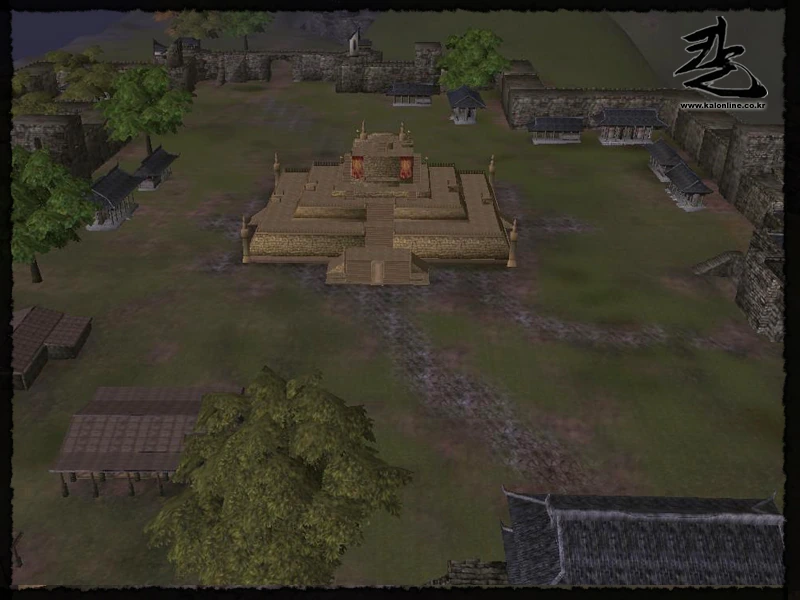
The first thing your eye finds is the staircase. It rises from a broad patch of grass and worn ground to a tiered stone platform at the centre of a walled courtyard. Two red banners hang near the top. The screenshot comes from a KalOnline scenery gallery that Sina Games published on 16 June 2005. The gallery records the date it appeared, and the capture date and in-game location remain unconfirmed. Sina Games scenery gallery
Look past the platform
The view is high enough to take in most of the enclosure. A break in the far wall opens on to the ground beyond. To the right, small buildings with dark tiled roofs sit close to the stone boundary. A leafy tree partly hides the wall on the left. In the foreground, another canopy and the corner of a roof extend out of the frame. Those nearer shapes give the scene depth and make the raised platform feel some distance away.
Look at the ground next. A pale, uneven track runs towards the viewer from the foot of the staircase, while another strip crosses the space off to the right. The red banners stand out against the muted grass, stone and roof tiles, drawing the eye back to the top of the steps. The smaller buildings are easy to miss on the first pass. Once you notice them, the open ground between the platform and the walls becomes as striking as the structure itself.
What the frame records
The upper-right corner carries the KalOnline logo and the game’s web address. A rough black border frames the scene. The publisher included the image in its scenery series with a general caption. The Chronicle also credits the same period publication where it uses the frame to illustrate its article on historical guild rankings. The Chronicle’s image source note
The high viewpoint lets you see the main structure, the open ground around it and the little buildings at its edges in one look. Follow the stairs and then the wall as far as the frame allows. The courtyard is one of the places early readers could explore with their eyes before they ever loaded the game.
Sources

Browse the KalOnline Screenshot Archive
Ready to return? Create a Kal2006 account, then get the Windows client or the Mac compatibility beta.